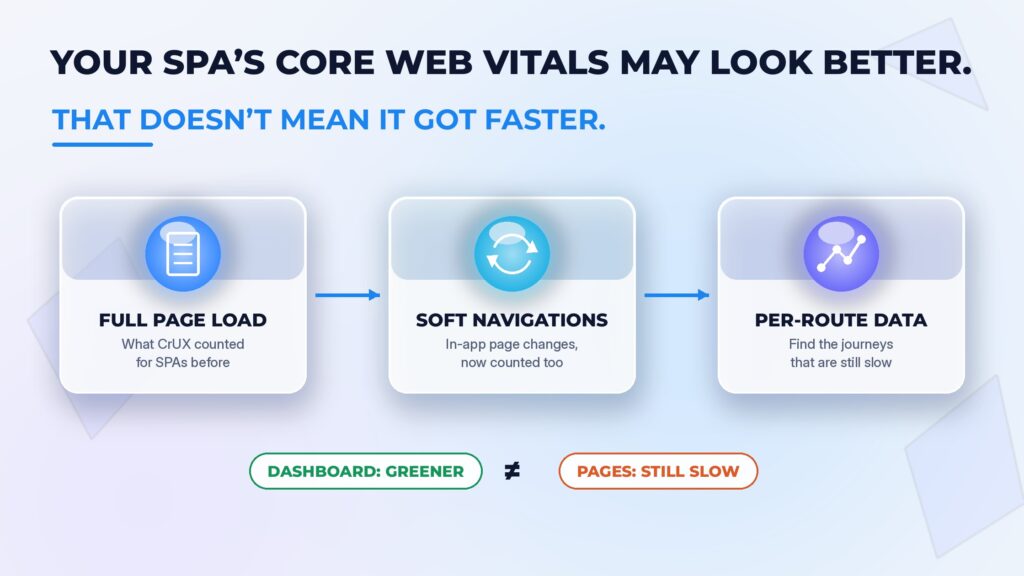
On 13 October, Chrome started publishing experimental versions of all three Core Web Vitals in the Chrome UX Report (CrUX) that include soft navigations. Those are the in-app page changes a single-page app (SPA) makes when it swaps content and updates the URL with JavaScript, instead of loading a new HTML document. Headless storefronts are often built this way.
For most sites, nothing will change. Chrome says around 70% of origins in CrUX have little or no soft navigation traffic. But if your storefront is a SPA and shoppers click through several views per visit, your scores on the new experimental metrics may look noticeably better. That will be tempting to report as a win just before peak. It is worth being clear about what the improvement actually means first.
In short: Chrome has added experimental CrUX metrics that include SPA soft navigations. Sites with many in-app page views may see better reported scores without any code or performance improvement. Stable Core Web Vitals are unchanged while the new metrics are evaluated.
What changed
Previously, CrUX did not treat subsequent SPA transitions as separate page loads. Interactions and layout shifts after the initial load could still be measured, but were attributed to the original page rather than separated by soft-navigation view. The new experimental metrics measure each soft navigation as its own page view:
- LCP with soft navigations covers both hard and soft navigations.
- INP with soft navigations is measured per view, rather than taking the slowest interaction across a whole SPA session.
- CLS with soft navigations groups layout shifts by individual view and URL.
They are available in the CrUX BigQuery dataset, the CrUX API and the CrUX History API, and CrUX Vis has a toggle to compare them with the stable metrics. Chrome treats a navigation as soft when it is started by a user action, changes the visible URL and results in a visible paint.
Google’s stable Core Web Vitals, and the data in Search Console, are unchanged for now. Chrome’s stated aim is to graduate the metrics from experimental in May 2027, but that is subject to feedback; Search Console is expected to switch to the new data only after they graduate.
Why the scores go up
Chrome’s own analysis is unusually direct about this. At origin level on Android, among origins where 75–100% of page views are soft navigations, the share with good LCP goes from 26% on the stable metric to 87% on the experimental one, a rise of 61 percentage points. In the post, Annie Sullivan explains: “This isn’t because SPAs are faster than multi-page websites (MPAs) overall, but because follow-up clicks are faster on any site.”
That is the key point for anyone reading a dashboard. Follow-up views reuse code and assets that were already downloaded on the first, slower load. Counting them adds a lot of quick page views to the data. The landing experience, the one many shoppers arriving from search or ads get, is not what changed.
For sites with a high share of soft navigations, INP and CLS also tend to improve, mostly because of how they are now grouped. Measuring INP per view rather than per session roughly doubles the Android pass rate for sites with mostly soft navigations, according to Chrome. Even so, Chrome notes that SPA-heavy sites still trail multi-page sites on good INP, and that heavy main-thread JavaScript during route changes can still cause problems. Splitting CLS by view brings SPA-heavy sites in line with multi-page sites on desktop, and nearly so on Android.
Across all origins, the September 2026 dataset shows 55.9% with good Core Web Vitals on the stable metrics, and 59.5% with soft navigations included. That is 3.6 percentage points, which Chrome’s release notes describe as a 6.4% relative increase. It is a measurement change, not a performance change.
The useful part: per-route data
Better headline scores are the least interesting part of this release. The more valuable change is at URL level. The CrUX API can attribute qualifying soft-navigation data to the destination URL, subject to traffic eligibility. That can help identify poorly performing product, category or basket pages, but it does not by itself show the sequence of pages a shopper followed. Use your own real user monitoring to analyse complete journeys.
Not every interaction counts as a soft navigation, either. Chrome’s definition requires a user action, a visible URL change and a visible paint, so adding to basket or applying a filter may not qualify if the URL doesn’t change. Those interactions still matter for INP, and they are often where heavy client-side work sits. A destination page that still has poor INP once it is measured per view is a real problem, not a measurement artefact. My earlier piece on INP as the ecommerce interaction budget covers how to set a budget for those interactions.
There are other limits to keep in mind. CrUX reflects Chrome users only. And the data is labelled experimental for a reason: Chrome says to expect some shifts from month to month as measurement improves, with more soft navigation metrics, for First Contentful Paint and navigation types, expected in the November release. If you run your own real user monitoring, Chrome’s soft navigations documentation explains how to measure them yourself, which gives you a check on the CrUX numbers.
Agree how to read it before peak
Black Friday is on 27 November. Between now and then, someone is likely to open CrUX Vis, flip the soft navigations toggle and see greener numbers. Having spent most of my career in frontend before moving into engineering management, I would rather a team agreed in advance how to report this than had to walk back a claim in January.
The risk isn’t the data. It’s a better-looking dashboard being read as “the site got faster” when no code changed, and that story then shaping decisions about where performance effort goes during the busiest weeks of the year.
How to check your own data
- Open CrUX Vis and enter the site’s origin.
- Compare stable and experimental metrics for the same device and time period.
- Check important individual URLs where sufficient data is available; lower-traffic pages may not have any.
- Label the metric version in reports, and cross-check with your real user monitoring.
Switching to the experimental view does not isolate hard loads.
Checklist: before you report the new numbers
- Report stable and experimental side by side. Label which is which, and don’t switch a trend line from one to the other mid-series.
- Know your soft navigation share. If most of your page views are soft, expect a large uplift that comes from measurement, not speed.
- Keep landing pages separate. The experimental CrUX metrics blend hard and soft navigations, and search and paid traffic often lands on a hard load. Keep monitoring hard-navigation LCP, and check how your RUM provider separates and attributes INP and CLS before comparing it with CrUX.
- Use per-route data to find slow destination pages. Look at category, product and basket pages, especially INP, where Chrome says SPA-heavy sites still lag. Full journey analysis needs suitable real user monitoring.
- Treat it as experimental. Expect monthly shifts, and don’t set targets on these numbers until they graduate.
- Cross-check with your own monitoring. Where you have real user monitoring, compare it with CrUX before drawing conclusions.
- Agree the wording in advance. Decide with product and marketing how an improvement will be described, so a measurement change isn’t presented as a performance win.
- Plan for Search Console. Chrome expects Search Console to switch to the new data after the metrics graduate, provisionally targeted for May 2027. Note that in your reporting now, so the change isn’t a surprise later.
The new metrics are a genuine improvement in how SPAs are measured. Used well, they should make slow storefront pages easier to find. Used carelessly, they could make the same journeys easier to ignore.
Sources and further reading
- Annie Sullivan — Experimental soft navigation metrics now available in CrUX (web.dev)
- CrUX release notes (Chrome for Developers)
- Soft navigations measurement (Chrome for Developers)
- Search Engine Journal — Google Adds Experimental Soft Navigation Metrics To CrUX
- INP is the ecommerce interaction budget